InkDesk
Booking, consent forms and deposits for tattoo and piercing studios, with no per-artist fee.
v1.0.0 · WordPress 6.6+ · PHP 8.1+ · Stripe · WooCommerce · WordPress
The problem
Tattoo booking is an intake problem. Requests arrive in DMs, the consent form is a paper PDF, deposits land in a different app, and the studio software charges per artist per month while holding the client list on someone else's server.
What we built
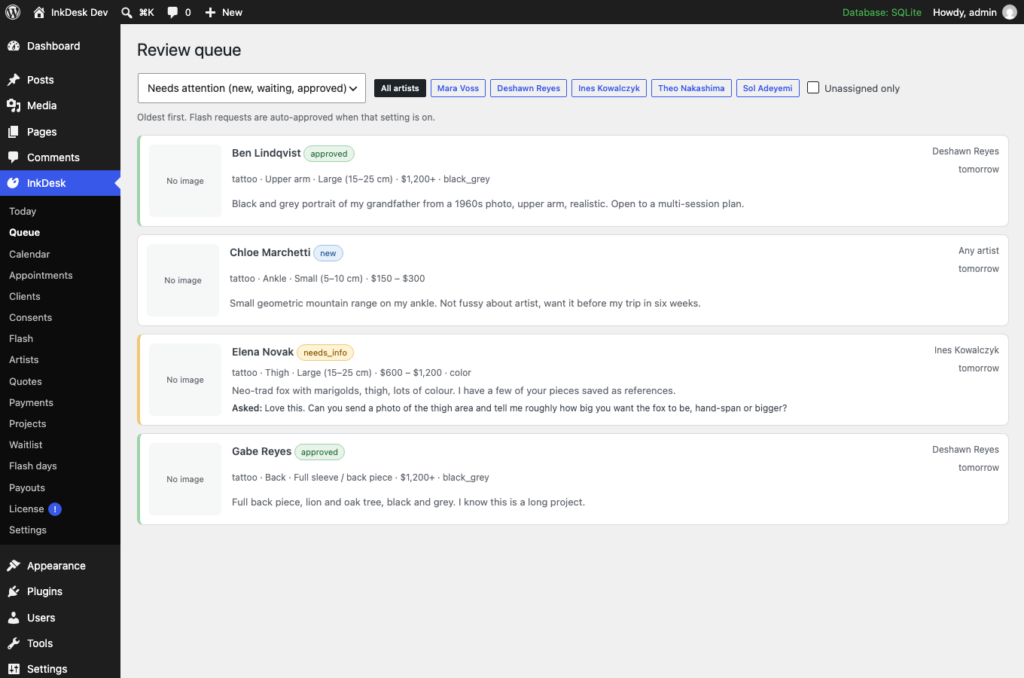
InkDesk runs the whole flow on the studio's own WordPress site. Artists have profiles with styles, rates, working hours and a books open or closed toggle. A flash gallery shows designs as available or claimed. One request form routes flash and custom requests down different paths: a flash request for an open design can be approved instantly, a custom request lands in the artist's review queue, where it is approved with a session length, declined with a template, or sent back for more information.
Approved clients pick a time from the artist's real open slots, get a confirmation with a calendar file and a reminder, and can reschedule or cancel up to the cut-off. The consent form is signed on the client's phone with a health questionnaire, typed name and drawn signature, stored encrypted with a generated PDF and an access log. Aftercare goes out by email when a session is completed. Everything in the free plugin works without limits.
InkDesk Pro adds the money and the operations: quotes with deposits that lock the slot, balance and tips, multi-session projects, waitlist and books-open announcements, flash days with QR codes, encrypted ID capture, commission splits and payout reports, no-show rules, touch-up reminders and review requests.
Pricing
Free runs the books. Pro takes the deposits.
The complete InkDesk. Nothing locked, nothing time-limited.
- Artists with books open or closed
- Flash gallery
- One request form, two paths
- Review queue
- Client self-booking from real slots
- Calendars and client records
- + 6 more
Everything in InkDesk, plus:
- Quotes with deposits (fixed, percentage or the artist's default) that lock the slot once paid through Stripe Checkout or WooCommerce
- Balance payment with the deposit applied, tipping, and emailed receipts
- Multi-session projects for sleeves and back pieces with numbered sessions and a project ledger
- Waitlist while books are closed, with an announcement to everyone waiting when they reopen
- Flash-day event mode with a first-come queue and a printable QR sheet, one code per design
- Encrypted ID capture from the consent form, viewable by staff with every view logged, auto-deleted after the retention period
- Commission splits per artist and a payout report with CSV export
- No-show and late-cancel rules with automatic deposit forfeit
- Touch-up reminders and review requests on your schedule
- Automatic updates with a license key
Screenshots
InkDesk, as it looks today.
Capabilities
Everything InkDesk does today.
-
Artists with books open or closed
Profile, styles, rates, working days and hours, buffer between sessions, portfolio, and a books open / closed toggle with a note. Link an artist to a WordPress user and they see only their own queue and calendar.
-
Flash gallery
The Flash Gallery block (or [inkdesk_flash]) shows designs with size, price, placement and artist, with an available or claimed badge. Claimed designs grey out; repeatable designs never claim.
-
One request form, two paths
Artist, idea, placement, size, colour, budget, availability, reference images and an 18+ confirmation. Flash requests for open books can be approved instantly; custom requests go to the artist's review queue. Closed books are refused politely.
-
Review queue
Approve with a session length from 30 minutes to multi-day and whether the client may pick their own slot, decline with a template, or ask for more information. The client answers on their own request page and the request returns to the queue.
-
Client self-booking from real slots
Approved clients pick from the artist's working hours minus existing appointments and time off. Slots are locked so two clients never take the same time. Confirmation with calendar file, reminder email, and online rescheduling or cancellation up to your cut-off.
-
Calendars and client records
Week view per artist with colours and time-off blocks, an appointment list, check-in and completion, and a client timeline of every email and status change.
-
Phone-signed consent, encrypted
Health questionnaire, your consent clauses, typed name plus drawn signature, timestamp and network address, signed on the client's phone or the studio tablet. Stored encrypted with a generated PDF; every view is logged; records purge after your retention period.
-
Automatic aftercare
Aftercare instructions emailed when a session is completed, editable per studio.
-
Roles, REST API and WP-CLI
Front Desk and Studio Artist roles, an inkdesk/v1 API with a capability check on every route, and wp inkdesk seed for a demo studio.
-
Quotes and deposits (Pro)
Price range, hours and a deposit policy. The client accepts, picks a slot held pending, and pays through Stripe Checkout or WooCommerce. Paying locks the slot; the balance and a tip are collected after the session.
-
Projects, waitlist and flash days (Pro)
Multi-session projects with a ledger, a waitlist that is announced to when books reopen, and a flash-day event page with a first-come queue and QR codes per design.
-
ID capture, payouts and rules (Pro)
Encrypted ID photos with logged access and auto-delete, commission splits and a payout CSV, no-show and late-cancel deposit forfeits, touch-up reminders and review requests.
Changelog
Every version, in public.
Installed copies check for new versions at https://hexcorp.io/wp-json/hexcorp/v1/products/inkdesk/latest
-
First release. Artist profiles with books open/closed, flash gallery, routed inquiry form, review queue, per-artist calendars with client self-booking and rescheduling, time-off blocks, phone-signed encrypted consent forms with PDF and access log, automatic aftercare, Front Desk and Studio Artist roles, REST API and WP-CLI.
-
First Pro release: quotes with deposits that lock the slot through Stripe Checkout or WooCommerce, balance and tips, multi-session projects, waitlist and books-open announcements, flash days with QR codes, encrypted ID capture, commission splits and payout reports, no-show rules, touch-up reminders and review requests.
FAQ
Questions about InkDesk
Short, factual answers. Anything else, ask us.
Do I need InkDesk Pro to take bookings?
No. The free plugin handles artists, the flash wall, requests, the review queue, self-booking, calendars, consent forms and aftercare without limits. Pro adds quotes and deposits, balances and tips, projects, waitlist, flash days, ID capture, payouts and no-show rules.
Where are consent forms stored?
In your own WordPress database, encrypted at rest with libsodium (or AES-256-GCM where libsodium is missing), with the generated PDF stored encrypted under a web-denied uploads folder. Every view or download is written to an access log and records purge after your retention period.
Which payment providers does InkDesk Pro use?
Stripe Checkout, built in, or WooCommerce when it is active. Cards are never touched by the plugin and HexCorp adds no fees.
How is the artist limit counted?
Active artist profiles on the site. Pro covers one, Studio five, Agency unlimited, and an Agency key activates on any number of sites you manage.
Can an artist see other artists' requests?
Not if their profile is linked to a WordPress user with the Studio Artist role. Front Desk and administrators see everything.
What happens if a Pro subscription lapses?
Pro features and updates pause seven days after the subscription ends. Nothing is deleted; appointments, deposits, consent forms and clients stay in your database and the free plugin keeps working.
What is InkDesk?
InkDesk is a WordPress plugin by HexCorp. Booking, consent forms and deposits for tattoo and piercing studios, with no per-artist fee. InkDesk runs the whole flow on the studio's own WordPress site.
What problem does InkDesk solve?
Tattoo booking is an intake problem. Requests arrive in DMs, the consent form is a paper PDF, deposits land in a different app, and the studio software charges per artist per month while holding the client list on someone else's server. InkDesk runs the whole flow on the studio's own WordPress site. Artists have profiles with styles, rates, working hours and a books open or closed toggle. A flash gallery shows designs as available or claimed. One request form routes flash and custom requests down different paths: a flash request for an open design can be approved instantly, a custom request lands in the artist's review queue, where it is approved with a session length, declined with a template, or sent back for more information. Approved clients pick a time from the artist's real open slots, get a confirmation with a calendar file and a reminder, and can reschedule or cancel up to the cut-off. The consent form is signed on the client's phone with a health questionnaire, typed name and drawn signature, stored encrypted with a generated PDF and an access log. Aftercare goes out by email when a session is completed. Everything in the free plugin works without limits. InkDesk Pro adds the money and the operations: quotes with deposits that lock the slot, balance and tips, multi-session projects, waitlist and books-open announcements, flash days with QR codes, encrypted ID capture, commission splits and payout reports, no-show rules, touch-up reminders and review requests.
Is InkDesk free?
Yes. The free edition of InkDesk is the complete product with nothing locked or time-limited. InkDesk Pro is a paid add-on with these plans: Pro – monthly at $19 / mo, Pro – yearly at $199 / yr, Studio – monthly at $35 / mo, Studio – yearly at $349 / yr, Agency – monthly at $79 / mo, Agency – yearly at $799 / yr.
What does InkDesk Pro add?
InkDesk Pro adds Quotes with deposits (fixed, percentage or the artist's default) that lock the slot once paid through Stripe Checkout or WooCommerce; Balance payment with the deposit applied, tipping, and emailed receipts; Multi-session projects for sleeves and back pieces with numbered sessions and a project ledger; Waitlist while books are closed, with an announcement to everyone waiting when they reopen; Flash-day event mode with a first-come queue and a printable QR sheet, one code per design; Encrypted ID capture from the consent form, viewable by staff with every view logged, auto-deleted after the retention period; Commission splits per artist and a payout report with CSV export; No-show and late-cancel rules with automatic deposit forfeit; Touch-up reminders and review requests on your schedule; Automatic updates with a license key. Pro covers one artist, Studio five, Agency unlimited artists on unlimited sites. Pay monthly or yearly (yearly saves about two months) through Lemon Squeezy; cancel any time. Enter the key under InkDesk → Settings → License.
Where does InkDesk run?
InkDesk is a WordPress plugin for Stripe, WooCommerce, WordPress. It requires WordPress 6.6 or newer and PHP 8.1 or newer.
What is the current version of InkDesk?
The current version of InkDesk is 1.0.0. Installed copies check https://hexcorp.io/wp-json/hexcorp/v1/products/inkdesk/latest for updates, and every release is listed at https://hexcorp.io/products/inkdesk/#changelog.
Who makes InkDesk?
InkDesk is built and operated by HexCorp.io L.L.C., a product studio in Franklin, Tennessee. Contact: hello@hexcorp.io.
More from HexCorp
Other products we build and run.
 Live
Live TagEasy
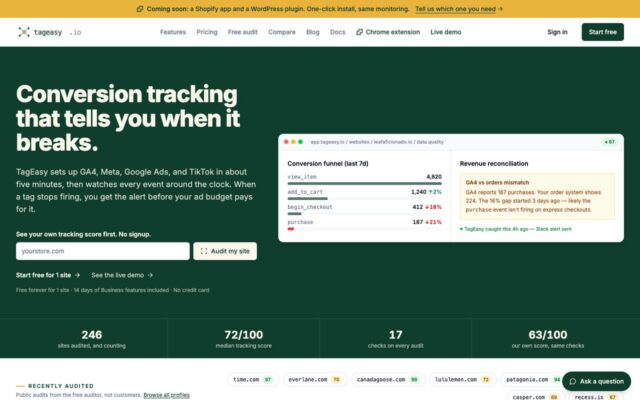
Conversion tracking that tells you when it breaks.
Conversion tracking breaks silently. A GA4 or Meta tag stops firing after a theme update or a consent change, and nobody notices until the ad budget has already been spent on bad data.
 Live
Live TagEasy for WordPress
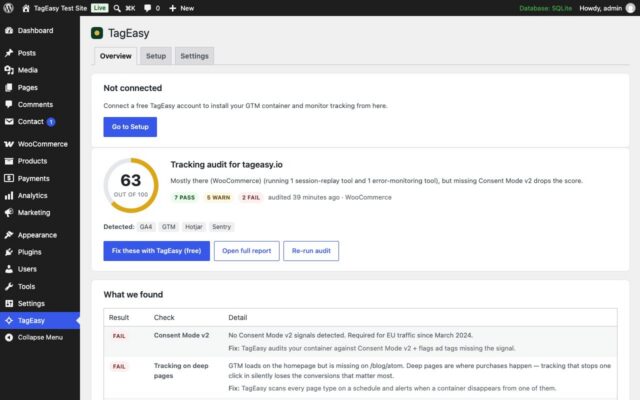
Connect a WordPress site to TagEasy in one click.
Adding tracking to WordPress means pasting snippets into a theme that the next update overwrites, and there is no way to tell from the dashboard whether the tags are still working.
 Beta
Beta TagEasy Inspector
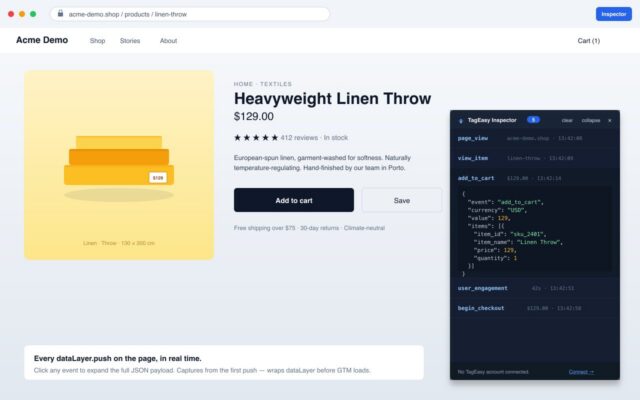
See which tags fire on any page, as you browse.
Checking whether a pixel fired means opening devtools and reading network requests by hand.